개요
며칠 전 AWS에서 벡터 클라우드 스토리지를 공개했다. S3 기반이기에 경제성과 내구성을 기대할 수 있을 것 같다.
나는 Qdrant로 벡터 DB를 구성하고 있었는데, Amazon S3 Vectors로 교체해볼까 한다.
Embeddings는 우선 Bedrock 대신, OpenAI embedding model을 사용했다.
Introducing Amazon S3 Vectors: First cloud storage with native vector support at scale (preview) | Amazon Web Services
Amazon S3 Vectors is a new cloud object store that provides native support for storing and querying vectors at massive scale, offering up to 90% cost reduction compared to conventional approaches while seamlessly integrating with Amazon Bedrock Knowledge B
aws.amazon.com
사용하기
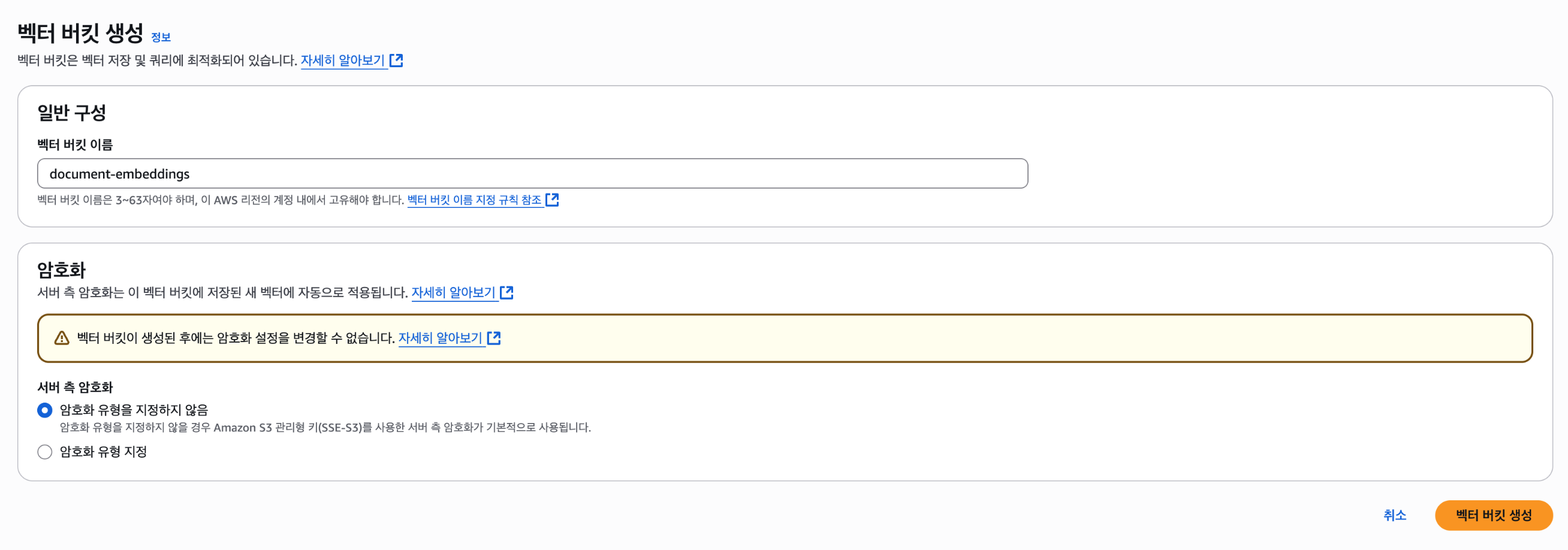
1. Bucket 생성
Sydney Region으로 테스트해본다. 현재 버지니아 북부(us-east-1), 오하이오(us-east-2), 오레곤(us-west-2), 프랑크푸르트(eu-central-1), 시드니(ap-southeast-2) 리전에서만 평가판으로 제공되고 있다.
서울에서 개인적으로 속도 테스트 해봤을때는, 오레곤 리전이 평균적으로 빠른 응답을 보였다.
Encryption type은 선택하지 않으면 기본적으로 Amazon S3 managed keys (SSE-S3) 기반의 server-side encryption을 한다.
이보다 advanced를 원하면 AWS Key Management Service 키를 사용한 서버 측 암호화(SSE-KMS)를 선택할 수도 있다.
2. Index 생성
Name과 Dimensionality를 지정한다.
물론 입력되는 Vector값은 여기 입력되는 dimensionality와 동일해야 한다.
Distance metric은 Cosine / Euclidean을 제공한다.
사용할 임베딩 모델의 recommended distance metric for more accurate results와 벡터 차원 수를 확인하여 선택하면 되겠다.
나는 OpenAI text-embedding-3-small을 사용하기 때문에 DIMENSIONS는 1536, METRIC은 Cosine으로 지정해 주었다.

메타데이터 구성도 보인다. 벡터 인덱스 만들고 나면 Vector data를 인덱스에 넣을 텐데, 그때 medata를 key-value 쌍 형태로 각 벡터에 붙일 수가 있다. 이는 Qdrant에서 payload의 metadata 기반으로 필터링하는 기능과 유사하게 보인다. (예를 들면 날짜/카테고리 등...)
메타데이터는 Filterable과 Non-filterable이 있는데, 위 단계에서 Non-filterable 메타데이터 key를 추가할 수 있다. (최대 10개)
크기는 벡터 당 전체 메타데이터(Filterable, Non-filterable 합쳐서) 40KB까지 가능하고, Filterable은 최대 2KB다.
Limitations and restrictions - Amazon Simple Storage Service
Limitations and restrictions Amazon S3 Vectors is in preview release for Amazon Simple Storage Service and is subject to change. Amazon S3 Vectors has certain limitations and restrictions that you should be aware of when planning your vector storage and se
docs.aws.amazon.com
[더 자세한 용량 / 개수 제한은 위 문서를 참고]
3. Vector embeddings 넣기, 쿼리
AWS CLI, AWS SDKs 또는 Amazon S3 REST API로 해당 작업이 가능한데,
AWS 블로그 SDK 예시 코드를 기반으로 했고, Embedding model만 Bedrock대신 openAI로 수정했다.
참고) 콘솔에서 UI로 확인할 수 있는 사항들이 제한적이다. 주로 AWS CLI를 통해 조회했고, 커맨드는 아래를 참고하자.
s3vectors — AWS CLI 2.27.58 Command Reference
Description Amazon S3 vector buckets are a bucket type to store and search vectors with sub-second search times. They are designed to provide dedicated API operations for you to interact with vectors to do similarity search. Within a vector bucket, you use
docs.aws.amazon.com
Step 1. 임베딩 생성
import openai
import boto3
import json
import os
from dotenv import load_dotenv

load_dotenv()

# OpenAI 클라이언트 생성
client = openai.OpenAI()

# 텍스트 입력
texts = [
    "Star Wars: A farm boy joins rebels to fight an evil empire in space",
    "Jurassic Park: Scientists create dinosaurs in a theme park that goes wrong",
    "Finding Nemo: A father fish searches the ocean to find his lost son"
]

# 임베딩 모델 지정
model = "text-embedding-3-small"

# 텍스트 → 임베딩
embeddings = []
for text in texts:
    response = client.embeddings.create(
        model=model,
        input=text
    )
    embedding = response.data[0].embedding
    embeddings.append(embedding)
Step 2. 임베딩 저장
# S3Vectors 클라이언트 생성
s3vectors = boto3.client("s3vectors", region_name="ap-southeast-2")  # S3 Vector Store 지원 리전 - Sydney

# 임베딩 저장
s3vectors.put_vectors(
    vectorBucketName="document-embeddings",
    indexName="document-embeddings-index",
    vectors=[
        {
            "key": "v1",
            "data": {"float32": embeddings[0]},
            "metadata": {"id": "key1", "source_text": texts[0], "genre": "scifi"}
        },
        {
            "key": "v2",
            "data": {"float32": embeddings[1]},
            "metadata": {"id": "key2", "source_text": texts[1], "genre": "scifi"}
        },
        {
            "key": "v3",
            "data": {"float32": embeddings[2]},
            "metadata": {"id": "key3", "source_text": texts[2], "genre": "family"}
        }
    ]
)
Step 3. 쿼리
# 쿼리 텍스트를 임베딩
input_text = "List the movies about adventures in space"
query_response = client.embeddings.create(
    model=model,
    input=input_text
)
query_vector = query_response.data[0].embedding

# 벡터 유사도 검색
query = s3vectors.query_vectors(
    vectorBucketName="document-embeddings",
    indexName="document-embeddings-index",
    queryVector={"float32": query_vector},
    topK=3,
    filter={"genre": "scifi"},
    returnDistance=True,
    returnMetadata=True
)

# 결과 출력
results = query["vectors"]
print(json.dumps(results, indent=2))
결과는 아래와 같다. filter={"genre": "scifi"}에 의해 1차 '니모를 찾아서("genre": "family")'는 필터링되었다.
movies about adventures in space에 가장 가까운 Star Wars가 가장 가까운 distance로 검색됐다.
# 검색 결과
[
  {
    "key": "v1",
    "metadata": {
      "source_text": "Star Wars: A farm boy joins rebels to fight an evil empire in space",
      "genre": "scifi",
      "id": "key1"
    },
    "distance": 0.7688703536987305
  },
  {
    "key": "v2",
    "metadata": {
      "source_text": "Jurassic Park: Scientists create dinosaurs in a theme park that goes wrong",
      "genre": "scifi",
      "id": "key2"
    },
    "distance": 0.8421887755393982
  }
]
문서 Loading - Chunking - S3 Vectors 저장 예시
기존에 Langchain으로 RAG를 구현해서 Qdrant 저장했었는데,
데이터 Ingestion 할 때만 Qdrant metatdata구성과 비슷한 구조로 S3 Vectors에 저장하도록 구현해 보았다.
물론 S3 Vectors는 지난주에 발표된 만큼, 아직 Langchain에서 Vectorstores로 제공하지는 않는다.
# 1. Loading
def load_file(file_url: str):
    response = requests.get(file_url)
    response.raise_for_status()

    content_type = response.headers.get('Content-Type', '').split(';')[0]
    print("[Header] Content-Type:", content_type)

    # normalize to internal type: "pptx", "docx", "pdf"
    normalized_type = get_normalized_type(content_type)

    with tempfile.NamedTemporaryFile(delete=False, suffix=f".{normalized_type}") as tmp:
        tmp.write(response.content)
        tmp_path = tmp.name
        print(f"[TempFile] 저장됨: {tmp_path}")

    # 로더 매핑
    loader_map = {
        "pptx": UnstructuredPowerPointLoader,
        "docx": UnstructuredWordDocumentLoader,
        "pdf": PyPDFLoader
    }

    loader = loader_map[normalized_type](tmp_path)
    return loader.load()


# 2. Chunking
def chunk_document(docs, chunk_size = 500, chunk_overlap = 100):
    splitter = RecursiveCharacterTextSplitter(
        chunk_size=chunk_size,
        chunk_overlap=chunk_overlap
    )
    return splitter.split_documents(docs)


# 3. Embedding & Vector storing
def store_vectors(chunks):

    # Chunk text → Vector
    client = openai.OpenAI()
    embeddings = []
    for chunk in chunks:
        response = client.embeddings.create(
            model=EMBEDDING_MODEL_NAME,
            input=chunk.page_content
        )
        embedding = response.data[0].embedding
        embeddings.append(embedding)


    # S3Vectors 벡터 저장
    s3vectors = boto3.client("s3vectors", region_name="us-west-2")
    vectors = []

    # chunks: List[Document]
    # embeddings: List[List[float]]
    for i, (chunk, embedding) in enumerate(zip(chunks, embeddings)):
        metadata = dict(chunk.metadata)
        metadata["source_text"] = chunk.page_content

        vector = {
            "key": f"v{i+1}",
            "data": {"float32": embedding},
            "metadata": metadata
        }
        vectors.append(vector)


    # 벡터 일괄 업로드
    s3vectors.put_vectors(
        vectorBucketName=VECTOR_BUCKET_NAME,
        indexName=INDEX_NAME,
        vectors=vectors
    )

    print(f"\nIngestion 완료: {len(chunks)}개의 청크가 S3 Vectors에 저장되었습니다.")
참고자료
Getting Started
https://docs.aws.amazon.com/AmazonS3/latest/userguide/s3-vectors-getting-started.html
Vector buckets 사용자 가이드
https://docs.aws.amazon.com/AmazonS3/latest/userguide/s3-vectors-buckets.html
s3 vectors CLI 커맨드 레퍼런스
https://docs.aws.amazon.com/cli/latest/reference/s3vectors/#cli-aws-s3vectors
OpenAI Vector Embeddings 가이드
https://platform.openai.com/docs/guides/embeddings
'AWS' 카테고리의 다른 글
| [SigV4] 개념, 서명된 요청 생성하기(JS) (0) | 2025.09.30 |
|---|---|
| AWS Summit 2025 후기, Day1 강연 (2) | 2025.05.18 |